Rollout plan
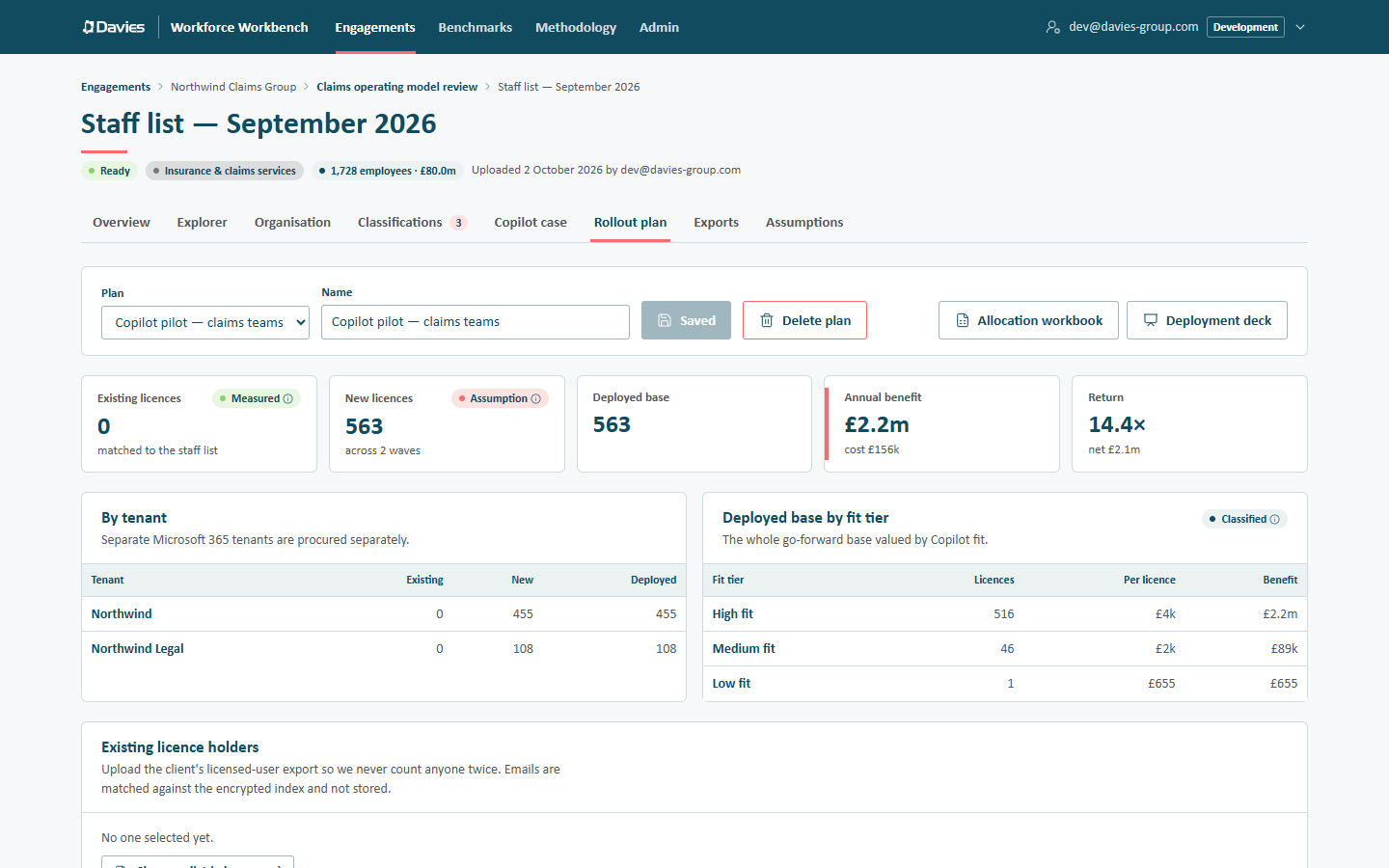
The Rollout plan tab turns the Copilot business case into a licence plan: waves of licences, each made of cohorts of people, counted per Microsoft 365 tenant and net of people who already hold a licence. Plans are saved with the staff list, and the most recently saved plan opens when we visit the tab.
Plans
The bar at the top holds:
- Plan: choose a saved plan, or + New plan. A new plan, called Copilot rollout, starts from a template that depends on the staff list:
- with reporting lines: Wave 1 — leadership (the top three levels of the reporting tree) and Wave 2 — high-fit roles (capped at 500 licences);
- without reporting lines: a single Wave 1 — high-fit roles, capped at 500 licences, since there's no tree to find leaders in.
- Name: the plan's name.
- Save plan (or Save changes once saved; it reads Saved when nothing has changed). Leads and analysts can save while the engagement is active.
- Delete plan deletes a saved plan, after confirming.
- Allocation workbook and Deployment deck: the exports (see Exporting).
Viewers, and everyone once the engagement is closed, see a Read-only notice that names the reason and adds Plans can still be opened and exported. The plan's inputs are then disabled. Saving is recorded in the audit trail as Saved Copilot plan.
Leadership levels, Reporting line and All managers cohorts need reporting lines. On a staff list without them, they select nobody, and the tab warns This staff list has no reporting lines: So “top levels”, reporting-line and manager selections can't tell leadership apart, and select nobody. Pick leaders by job title or another Attribute instead, or upload a staff list with a manager column.
The result
| Tile | Meaning |
|---|---|
| Existing licences | People already licensed. Beneath it, matched to the staff list, or N not in this list when some of the client's list didn't match anyone. |
| New licences | New licences across all waves. |
| Deployed base | Existing plus new: everyone who'll hold a licence. |
| Annual benefit | The deployed base's modelled benefit, with its licence cost. |
| Return | Benefit ÷ licence cost, with the net benefit. |
Two tables follow:
- By tenant: Existing, New and Deployed licences for each tenant. Separate Microsoft 365 tenants are procured separately. People with no tenant count under Unassigned.
- Deployed base by fit tier: the whole go-forward base valued by Copilot fit: Licences, Per licence and Benefit for each Fit tier.
Existing licence holders
Upload the client's licensed-user export so we never count anyone twice.
- Choose a list (.xlsx or .csv).
- Pick the Column with emails or employee IDs (a column whose header mentions email, UPN or user principal is chosen by default).
- Choose Match N rows.
If most values look like emails, they're matched against the encrypted email index. That needs stored names and emails and PII access; otherwise the card says the list needs an employee ID column. The emails aren't stored, only the matched employee IDs. See Names, emails and personal data.
Existing holders are never allocated a new licence, but they count in the deployed base and its benefit.
Assumptions
The same assumptions as the Copilot case: licence price, productivity realised, value base and the share of value captured by fit tier. In a plan they're saved with the plan, so a plan's figures are reproducible.
Waves
Each wave has a name (edit it in place), its own figures and one or more cohorts.
| Wave figure | Meaning |
|---|---|
| New licences | Licences this wave adds. |
| In scope | Everyone the wave's cohorts select, with how many are already covered (existing holders or earlier waves). |
| Capped out | Eligible people beyond the wave's cap. |
| Annual cost | This wave's licence cost. |
| Benefit | This wave's modelled benefit, and net of cost. |
A line under the figures shows the wave's licences by tenant.
Cap this wave at N licences (highest benefit first): leave empty for no cap. When a wave is capped, the people with the highest modelled benefit are taken first.
Waves are processed in order, and nobody is licensed twice: a person selected by wave 2 who was already covered by wave 1 (or holds a licence already) isn't counted again.
Add wave adds a wave (starting with a Copilot fit tier cohort); Remove wave removes one.
Cohorts
A cohort is a named rule: Include anyone matching one or more selectors (Add another way to qualify adds another), Except anyone matching any exclusion (Add exclusion). The cohort's line shows how many new licences it contributes and a plain description of its rules.
| Selector | Selects |
|---|---|
| Leadership levels | Everyone in the top N levels of the reporting tree. |
| Reporting line | Everyone reporting into chosen leaders, directly or indirectly, optionally including the leaders. Find a leader by title, ID or name. |
| Attribute | Business, division, country, tenant, role…: rows whose value for the chosen field is one of the chosen values. Fields: business, division, sub-division, department, location, country, tenant, role category and role. |
| Copilot fit tier | Roles by how Office-centric they are: one or more of high, medium, low fit. |
| All managers | Anyone with direct reports. |
| Named list | Upload a list of emails or employee IDs, matched as for existing holders. |
Add cohort adds a cohort to a wave; Remove cohort removes it.
Wave 1: Leadership levels 3 (sponsors first; needs reporting lines). Wave 2: Copilot fit tier high, capped to the pilot budget. Wave 3: Attribute business = the pilot business, Except Copilot fit tier low.
Exporting
The Brand list beside the export buttons chooses Davies, co-branded or the client's brand for both files, as on the Exports tab, and shares that tab's choice.
- Allocation workbook (Excel): a Summary sheet, then one sheet per tenant (Tenant — new) listing each new licence with the person's employee ID, job title, business, division, role, Copilot fit, Wave, Selected by (the cohorts) and modelled benefit, and an Existing licences sheet. With stored names and PII access, names and emails are revealed for the people receiving new licences only (audited with the purpose Copilot allocation workbook: and the plan name) and added as the first two columns of the tenant sheets; existing holders stay listed by employee ID. Otherwise every list is by employee ID only. The export is recorded as a named export when it includes names.
- Deployment deck (PowerPoint): the plan's waves, tenants, Copilot fit tiers, cost and return, for the client's deployment team. It never contains names.
A saved plan can also be included in the Copilot business case HTML report on the Exports tab.
Step by step: Plan a Copilot pilot.