Update pay data
When a staff list has no salary for someone, the Workbench prices them at the ONS ASHE median for their UK SOC-2020 occupation: the full-time gross annual pay from ASHE Table 14.7a. The built-in reference data uses ASHE 2025 provisional. The ONS publishes ASHE 2026 provisional on 22 October 2026, and each new edition should be loaded as a new reference data version.
Who: administrators, on Admin → Reference data.
Publishing new pay data never changes a figure a client has already seen. New staff lists use the new version; existing ones keep the version they were scored with until a lead or analyst chooses to rescore them.
1 · Get the new figures
From the ONS release, take the same table and sheet as the current data, so the new figures are like for like: Table 14.7a, the Full-Time sheet, gross annual pay by four-digit SOC 2020 occupation, with the median, 25th percentile and 75th percentile.
Where ASHE suppresses a figure (shown as x or ..), leave the cell blank; see step 4 for suppressed medians.
2 · Start a draft
On Admin → Reference data, choose Start a draft. The draft copies the live version. There's at most one draft at a time, so check the header first: if a colleague already has a draft open, agree who's editing.
3 · Round-trip the pay table through a spreadsheet
Open UK occupations and pay (under Occupations).
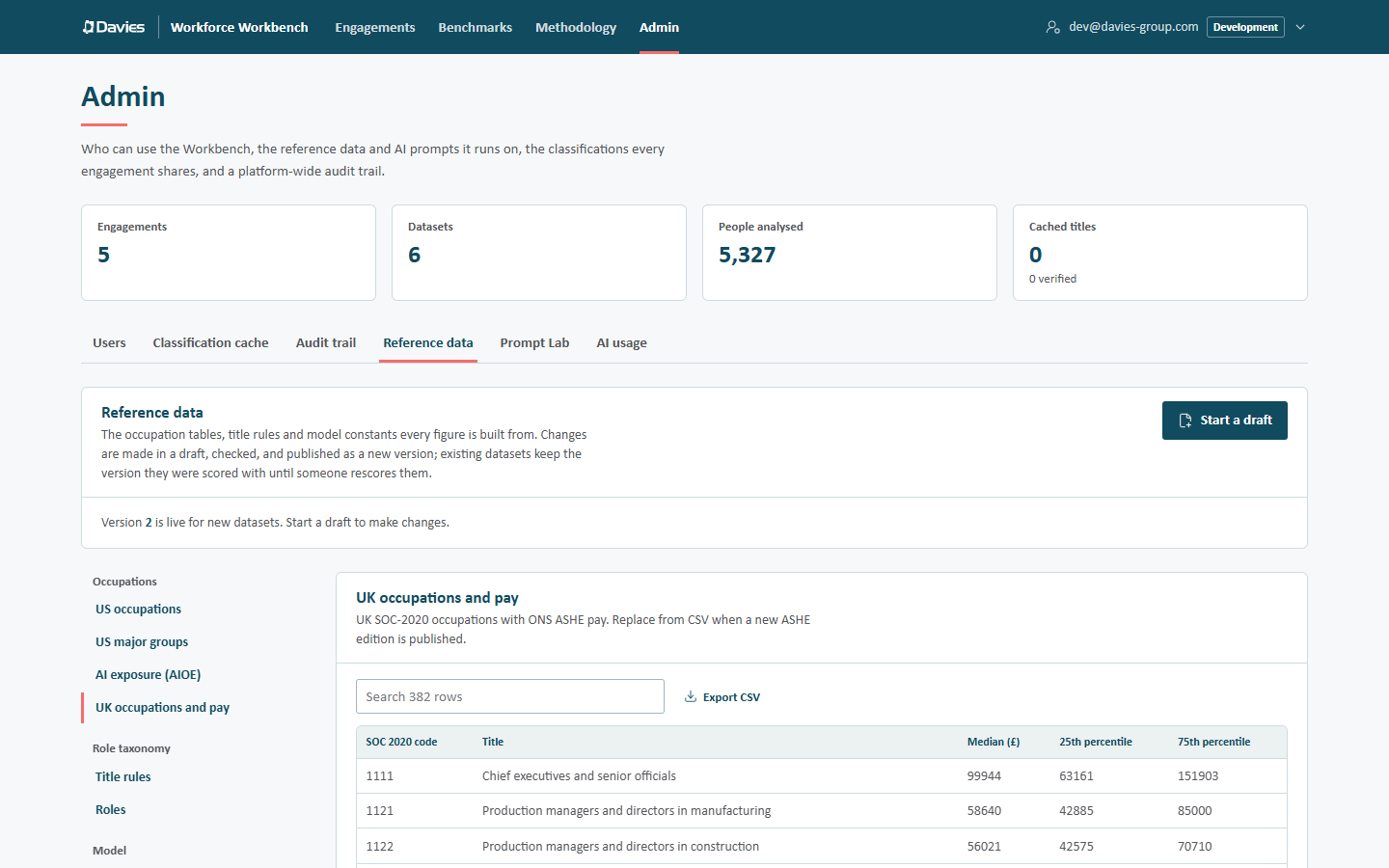
UK occupations and pay: one row per SOC 2020 occupation.
- Choose Export CSV. The file's header row names each column:
code,title,median,p25andp75. - In Excel, update
median,p25andp75from the new edition. Keep the header row. Leavep25orp75blank where ASHE suppresses them. - Save it as CSV (in Excel, CSV UTF-8 (Comma delimited)), then choose Replace from CSV and pick the file.
Every problem is reported with its line, for example Line 14, median: Not a number., and nothing is imported until the file is clean.
4 · Deal with suppressed medians
A code whose median ASHE suppresses has no row in the pay table. It's priced by a proxy median instead (the Proxy medians table, in the same section), or failing that the Fallback median (£).
- If a code loses its median in the new edition, delete its row from the pay table and add a proxy for it, if roles or industry-pack rules use it. Otherwise validation reports an error: a role's or pack rule's UK code has no ASHE median or proxy.
- If a code gains a published median, the ASHE median wins over any proxy; the proxy can be removed.
5 · Record the new edition
Open Sources → Sources of record and update the ASHE source (id ashe): its Edition (for example ASHE 2026 provisional (full-time)), Citation and Link. Every report's methodology section quotes this source, so it must match the data.
6 · Check, save and publish
- Save draft.
- Fix everything in the problems list. Warnings, such as a 25th percentile above the median, don't block publishing, but check each one against the source.
- Choose Publish version N and fill in What changed, and why, for example ASHE 2026 provisional (full-time) pay loaded; proxies reviewed.
The new version is live for new staff lists at once. Publishing is recorded in the audit trail as Published reference data, and the notes appear in the version history and on the Methodology page.

The version history. Every published version is kept unchanged.
7 · Let the teams know
Each existing staff list now offers the new version:
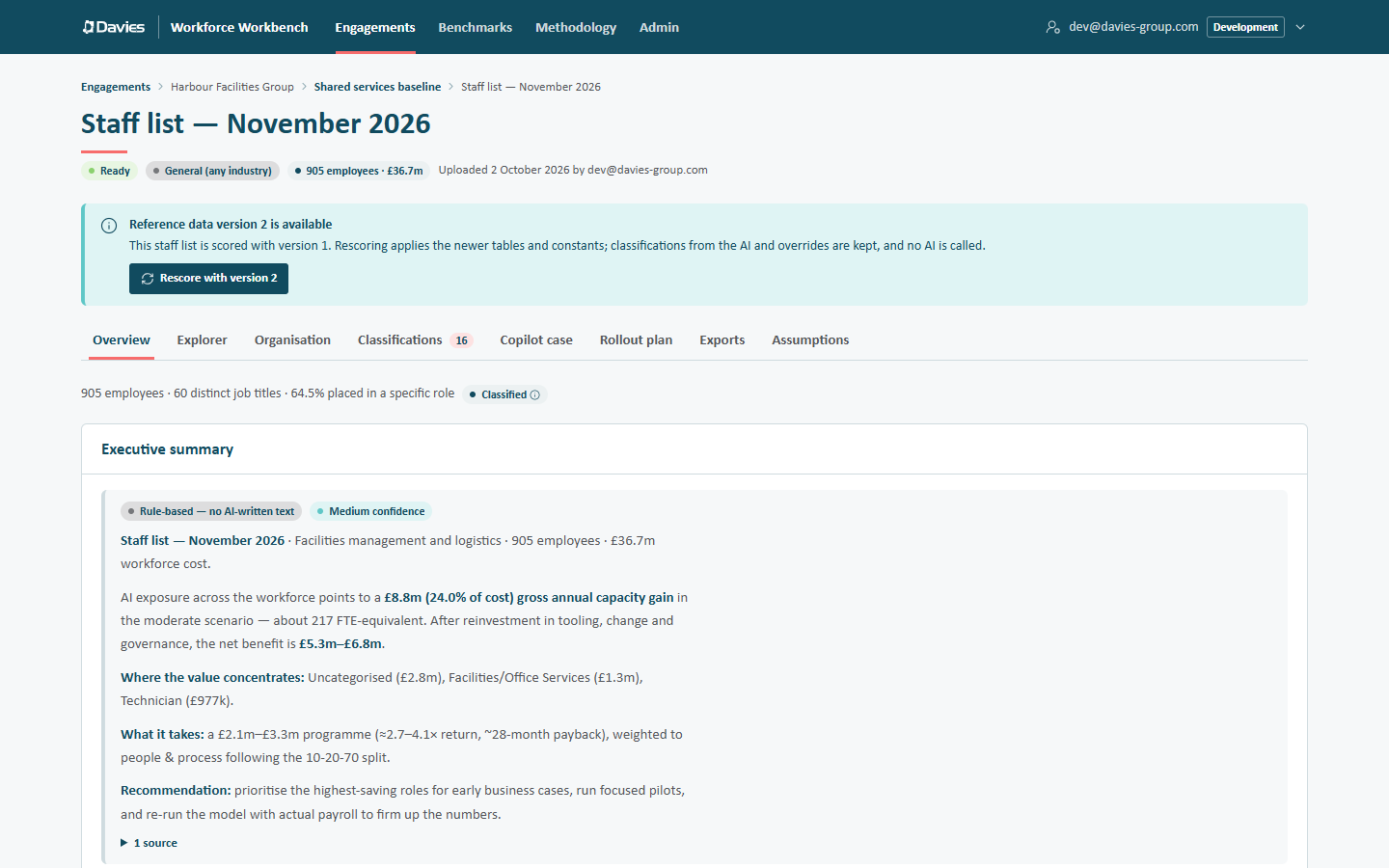
The offer on a staff list scored with an older version.
Tell the engagement leads, so they can decide per staff list:
- Rescore with version N applies the new tables and constants. Classifications from the AI and overrides are kept, and no AI is called. The rescore is audited (Rescored with new reference data).
- People with a client-supplied salary aren't affected by new pay data; only those priced at the benchmark move.
- A staff list on the old version still reproduces its earlier figures exactly. Compare warns when two lists are on different versions.
If something's wrong after publishing
Published versions can't be changed. Publish a correction as a new version, or roll back: in the version history, choose Draft from this on the previous version and publish it again as a new version.
See Reference data for the full editor.