Refresh with a new staff list
When the client sends an updated staff list (after a restructure, or simply a later month), we upload it as a new staff list in the same engagement rather than replacing the old one. Both stay side by side, so we can compare them, and anything set at engagement level applies to both.
Who: leads and analysts, on an active engagement.
Steps
- Check the new file as for the first one: see Preparing a staff list. Ask the client for the same columns and headings as last time.
- Open the engagement and choose Upload staff list.
- Choose the file. If its headings match the earlier list's, the mapping is reused: We reused the column mapping from … Check it anyway.
- Set the row filter again under Choose who to include, with the same rule as last time (for example, keep only Active). The filter isn't carried over, and a different filter makes the headcounts incomparable.
- If tenants come from email domains, rename and merge the domains the same way as before.
- Name the staff list after its date, for example Staff list — January 2027, and decide again whether to Store names and emails, encrypted.
- Choose Upload N employees. Overrides are applied automatically, before any other classification source.
- On the new list's Classifications tab, review only the titles that are new or need review.
- On its Assumptions tab, apply the assumptions agreed for the earlier list, if they were changed from the defaults, and Save and rescore.
- Back on the engagement, choose Compare. See Compare the two lists.
What carries over, and what doesn't
| Carries over to the new staff list | Has to be set again |
|---|---|
| Classification overrides: they belong to the engagement and apply to every staff list, including future uploads. | The row filter and tenant names chosen at upload. |
| The column mapping, when the headings match. | Saved assumptions: a new list starts from the reference data defaults for the employer-cost multiplier, realism discount and location factors, not from the earlier list's values. |
| Engagement settings: industry pack, region, sharing of classifications, benchmark contribution and retention. | Rollout plans and their matched licence holders: plans belong to a staff list. Build a new plan, and match the client's latest licensed-user export again. |
| The team and everyone's PII access. | AI-written text: the executive summary and value-chain map are per staff list. |
| Titles already in the shared classification cache (when the engagement shares classifications). | Stored names and emails: chosen again at upload. |
The new list is scored with the live reference data version. The earlier list keeps the version it was scored with until someone rescores it.
Compare the two lists
Choose Compare on the engagement, with the earlier list as From staff list and the new one as To staff list.
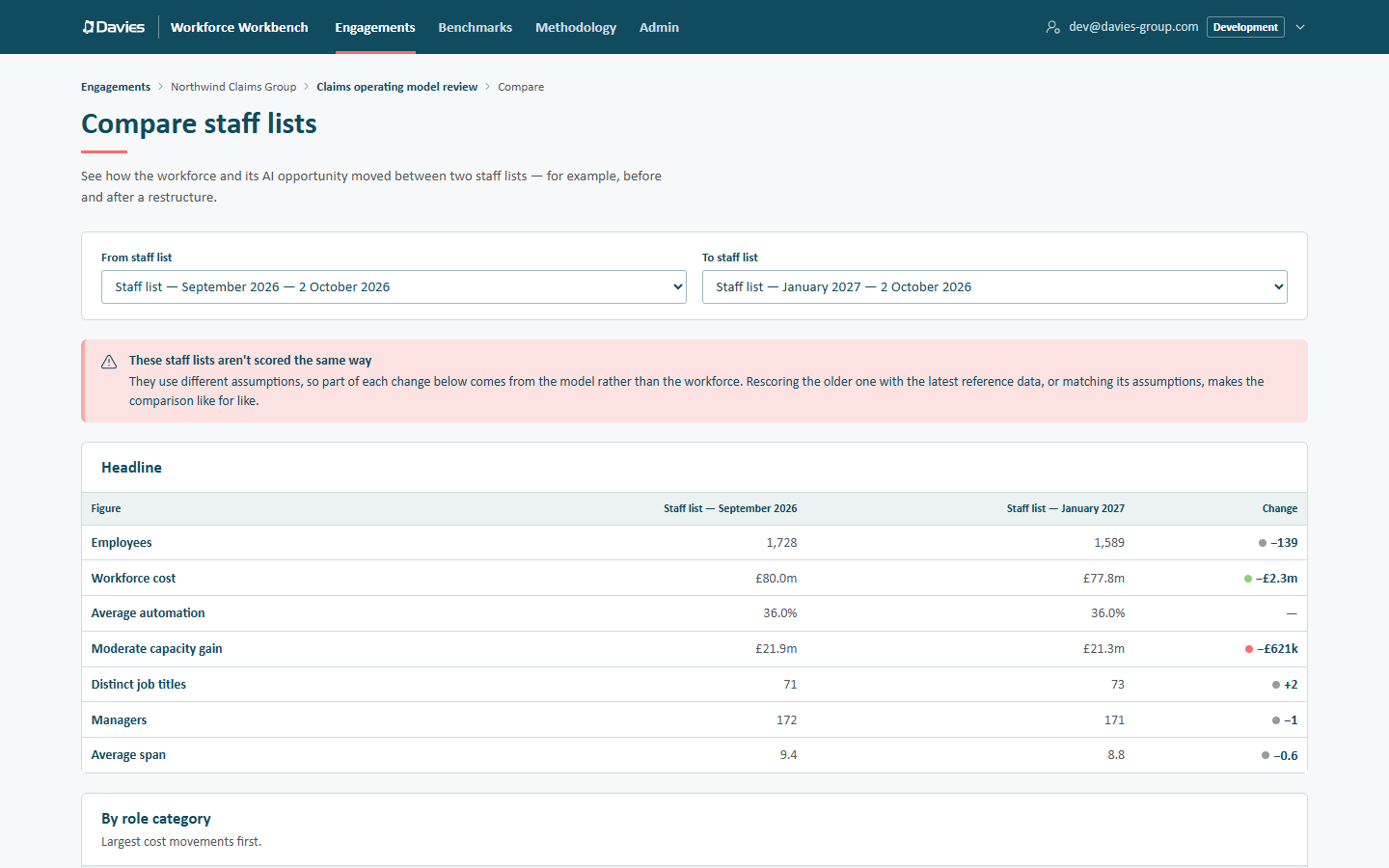
A comparison that warns the two lists aren't scored the same way.
If the page says These staff lists aren't scored the same way, part of each change comes from the model rather than the workforce. Before quoting any movement:
- Different reference data: open the older list and choose Rescore with version N so both use the same version.
- Different assumptions: make the two lists' Assumptions match, then Save and rescore.
Also check that both lists were filtered the same way at upload; the comparison can't tell. See Compare staff lists.
Keep or delete the old list?
Keep it while it's useful for comparison. Deleting a staff list removes its rows, stored names and emails and its Copilot plans; the audit trail keeps a record. Overrides aren't affected, because they belong to the engagement.
An engagement that contributes to Benchmarks contributes its most recently uploaded finished staff list, so a refresh also updates its contribution.