Questions and troubleshooting
Access
I can't see an engagement a colleague mentioned. We only see engagements we're on the team of. Ask the engagement's lead to add us on its Team tab.
I'm not in the colleague picker on a team. We appear once we've signed in at least once. If we can't sign in, ask an administrator to add us on Admin → Users.
I get "This account hasn't been set up yet". Our email domain isn't on the platform's allowed list, and no administrator has added us. An administrator can add us on Admin → Users. Retrying won't help until they do.
I get "This account has been switched off". An administrator deactivated the account. Ask them to reactivate it on Admin → Users.
The page reloaded on its own. Our single sign-on session expired; the Workbench reloads once to sign us back in. Anything saved is safe. See Signing in.
I can't see names, even as an administrator. Names need PII access on the engagement, which administrators don't get automatically and can't grant themselves. Ask a lead on the engagement to tick it for us on the Team tab, and check the staff list was uploaded with names and emails stored.
The PII access box on my own row is greyed out. That's deliberate: nobody can grant access to names and emails to themselves, administrators included. Another lead (or an administrator) has to tick it for us.
A screen says "Read-only". The notice names the reason: the engagement is closed (a lead can reopen it on Settings), its personal data has been purged, or we're a viewer (the lead can make us an analyst). The inputs we can't save are disabled.
Uploading
The file won't read.
Use .xlsx or .csv, one row per employee with headers in the first row, under 20 MB. Older .xls files need saving as .xlsx first.
The upload is refused for size. A staff list can hold up to 50,000 employees (Too many people for one staff list). Filter to the population in scope in step 3, or split larger lists (for example by business) into separate engagements.
The upload stopped part-way. If it stopped while classifying, choose Continue beside the staff list on the Staff lists tab. If it stopped while sending rows (Upload incomplete), it can't be resumed: delete that staff list and upload the file again.
Continue didn't use AI. Continue uses the choice made at upload. If Classify job titles with AI was off then, the staff list is never sent to the AI classifier, even on resume.
Some salaries were ignored.
The upload page says how many: salaries below £1,000 or above £10m a year are treated as data errors (hourly rates or codes, usually) and those people get the benchmark salary instead. Values like £42,500 and 45.5k are read correctly.
"Store names and emails, encrypted" is greyed out. Map a Name or Work email column first, and check we have PII access on the engagement. The hint under the box says which is missing.
"Classify job titles with AI" is greyed out. AI isn't configured on this environment. Titles use overrides, the industry pack, the shared cache and the rules.
The upload says many people's manager "isn't in the list". The staff list was filtered, or covers part of a group, so some managers aren't in it. Those people appear at the top level of the organisation chart.
Classifications and figures
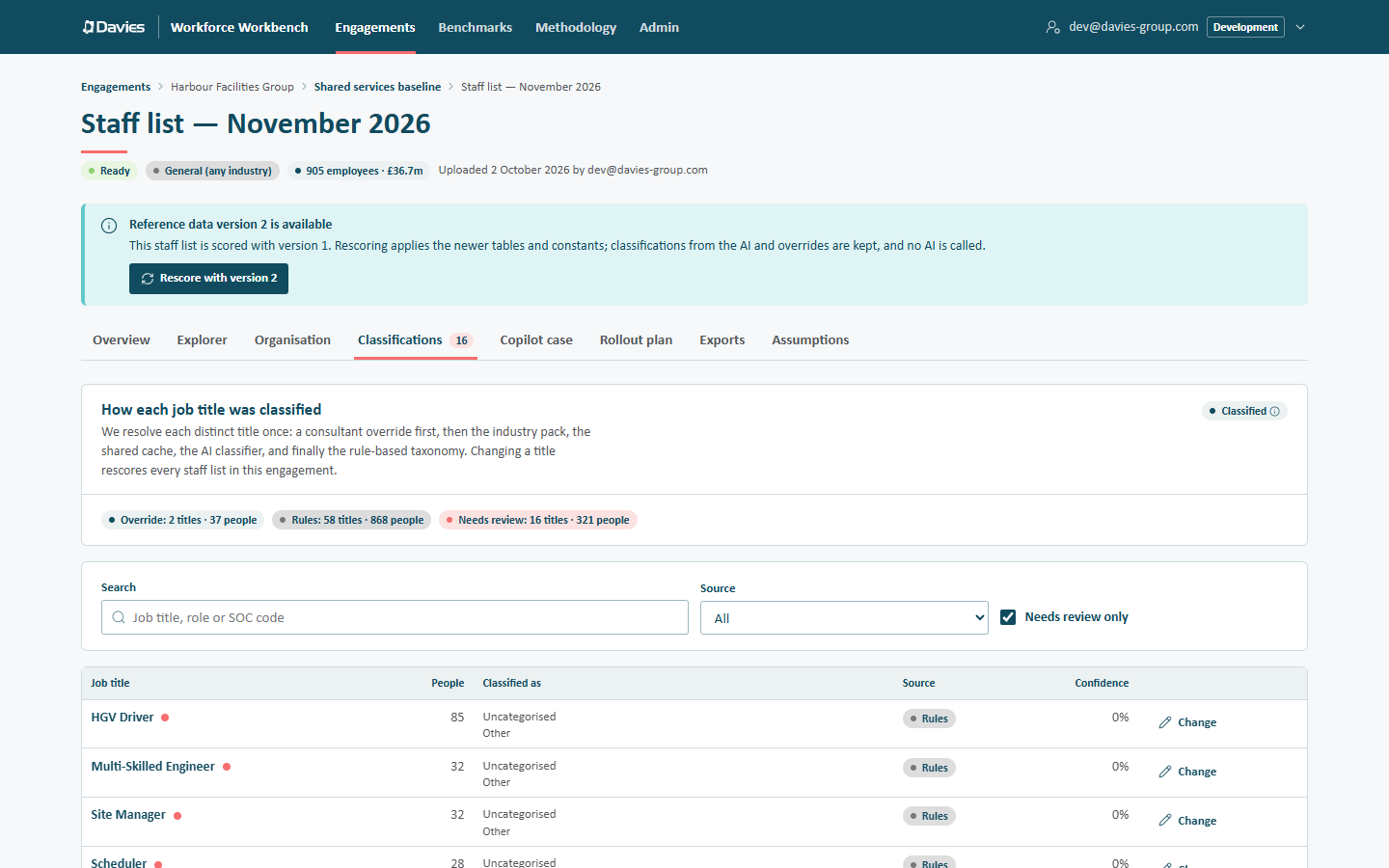
A title is obviously wrong. Set an override on Classifications → Change. It applies to every staff list in the engagement. See Classifications and overrides.
An override was refused because a reference data version "doesn't have that occupation code". Another staff list holding the title is pinned to an older reference data version that doesn't know the code or role. Rescore that staff list with the latest version, then set the override again.
Lots of titles need review after upload. AI may have been unavailable (budget spent, not configured, or switched off at upload), so titles fell back to the rules, and unmatched titles land on Other / Uncategorised. Work through the titles with most people first.
Why is our figure different from last month's for the same staff list? Check whether the staff list was rescored onto newer reference data (the audit trail shows Rescored with new reference data), whether assumptions were saved, whether the engagement's industry pack changed (which rescores every staff list), and whether overrides were added or removed.
The capacity gain looks too high for the client's comfort. It's gross annual capacity. Use the Conservative scenario, a realism discount on the Assumptions tab, and the Net of reinvestment range, and be clear it isn't a headcount target.
Salaries look wrong for a location. Check the person's Country and Location map to the right region (a country value must match exactly; a location matches the first region with a keyword it contains), and the region's factor on Assumptions. Client-supplied salaries aren't adjusted.
Figures in the Explorer and the report differ. They shouldn't. The Explorer rescores with the staff list's saved assumptions and reference data version. If assumptions have unsaved changes on the Assumptions tab, those only affect that tab's preview.
Copilot payback says "Over 10 years" or "No payback". The benefit takes more than ten years to repay the licence cost, or never covers it. Check the fit tiers, the licence price and the productivity assumption.
Compare warns that the staff lists "aren't scored the same way". They use different reference data versions or assumptions, so part of each movement comes from the model. Rescore the older one, or match its assumptions, before quoting movements.
Benchmarks say "Not enough other engagements yet". Benchmarks need five contributing engagements, counted after leaving out the engagement being compared. Figures are also rounded, so they won't match any one engagement exactly.
AI
The executive summary says "Rule-based — no AI-written text". No one has written one with AI yet, or the staff list was rescored since, which clears cached AI text. A lead or analyst can choose Write with AI.
"Write with AI" says the budget has been reached. AI features pause for the rest of the month when the platform budget (set in US dollars, because Gemini is billed in US dollars) is spent. The rule-based text stays. An administrator can see spend on Admin → AI usage.
The AI answer to a question says it can't answer. Ask this workforce only sees the analysis's aggregate figures, not rows. Rephrase in terms of roles, categories, businesses, scenarios or costs, or use the Explorer for row-level questions.
Deliverables
The HTML report opens without its interactive parts in Teams or Outlook. Their previews block scripts. Download the file and open it in a browser.
The finance workbook button is disabled. It needs row-level data, which has been purged for this engagement (Needs row-level data, which has been purged.).
Names appear in the allocation workbook but not elsewhere. That's by design: it's the only export that can include names, and only after an audited reveal by someone with PII access.
Engagement lifecycle
The engagement is read-only. It's closed. A lead can reopen it on Settings before it's purged.
An old link to a staff list's Explorer (or another tab) opens the Overview. The engagement's personal data has been purged, so only the Overview and Exports tabs remain.
A client wants their data deleted now. A lead closes the engagement, then chooses Purge personal data now on Settings. Anonymised summaries remain; an administrator can delete the engagement to remove those too.