Classifications and overrides
Every distinct job title in a staff list is classified once, to:
- a US SOC-2018 occupation, the key for AI exposure research;
- a UK SOC-2020 occupation, the key for UK salaries; and
- a Workbench role: a role category and sub-category, the key for role-based lenses such as Copilot fit and the value chain.
The classification drives each person's exposure and salary, so a wrong classification means wrong figures for everyone with that title. The Classifications tab is where we check and correct them.
How a title is classified
Sources are tried in this order; the first that applies wins:
| Order | Source | Label | What it is |
|---|---|---|---|
| 1 | Engagement override | Override | A consultant's explicit choice, with a rationale. Applies to every staff list in the engagement. |
| 2 | Industry pack | Industry pack | The engagement pack's deterministic rules, with their own occupation codes. |
| 3 | Shared cache | Shared cache | A previous AI classification of the same normalised title in the same industry pack, if the engagement shares classifications. |
| 4 | AI classifier | AI | The AI maps the title to real SOC codes in both systems with a confidence. Codes that don't exist in the reference tables are rejected. Used only if Classify job titles with AI was ticked at upload. |
| 5 | Rules | Rules | The Workbench's title-pattern taxonomy, with a published SOC crosswalk for each role. |
Titles are matched case-insensitively, ignoring surrounding punctuation and repeated spaces, so Claims Handler, claims handler and Claims Handler – are the same title.
The review queue
A title needs review when:
- it came from the AI or the shared cache with a confidence below the review threshold (60% in the built-in reference data); or
- no rule matched it, so it landed on Other / Uncategorised.
Overrides and industry-pack rules never need review.
The Classifications tab label carries a salmon count of titles needing review. On the tab:
- the How each job title was classified card shows a pill per source (for example Rules: 71 titles · 1,728 people) and Needs review: N titles · M people, or Nothing waiting for review;
- Needs review only is ticked by default when anything needs review;
- Search (Job title, role or SOC code) and the Source filter narrow the list.
The table shows each Job title (with a salmon dot when it needs review), People, what it was Classified as (the role, its category and the US and UK codes), the Source and the Confidence.
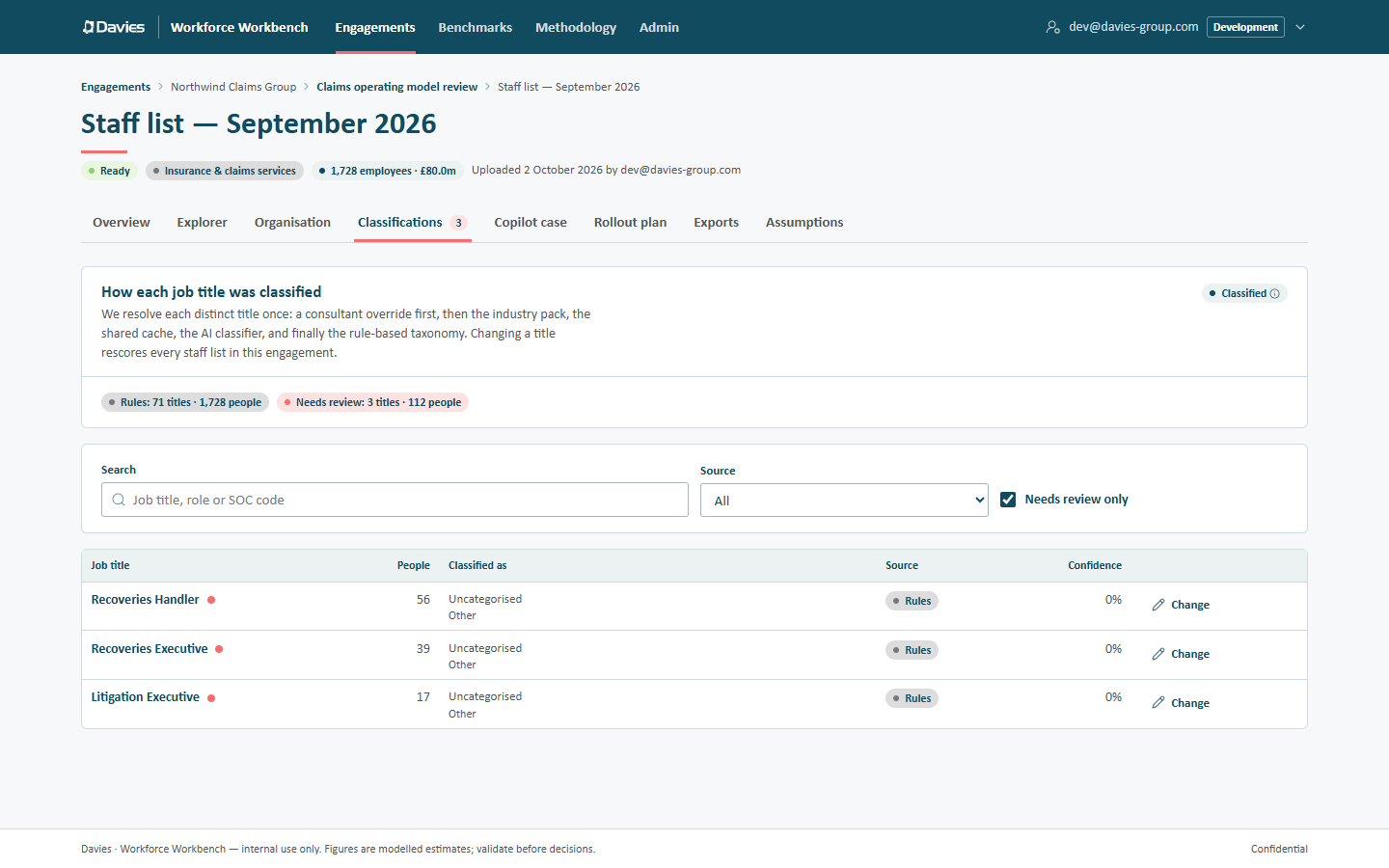
Sort out the titles with the most people first. A single mis-classified title with 300 people in it moves the numbers far more than fifty titles with one person each.
Setting an override
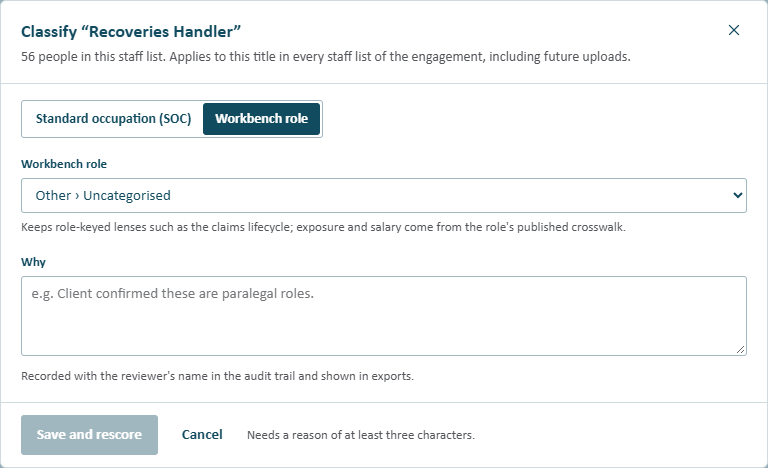
Leads and analysts see Change on each row while the engagement is active. (Otherwise the card shows a Read-only notice saying why.) It opens Classify “…” (with the title), which says how many people hold the title in this staff list and that the override applies to this title in every staff list of the engagement, including future uploads.
Choose how to classify it:
Standard occupation (SOC)
Pick both codes by searching titles or codes:
- US SOC-2018 (AI exposure), for example claims adjusters or 13-1031;
- UK SOC-2020 (salary), for example solicitors or 2412. Codes listed as Proxy median have no published ASHE median and use a proxy.
Exposure then comes from the US occupation's published AIOE percentile, and salary from the UK occupation's ASHE median.
Workbench role
Pick a role (Category › Subcategory). This keeps role-keyed lenses such as the claims lifecycle; exposure and salary come from the role's published crosswalk. Choose this when the title is a recognised Workbench role and we want it counted in role-based views.
Then fill in Why (at least three characters), for example Client confirmed these are paralegal roles. It's recorded with the reviewer's name in the audit trail and shown in exports. Until everything is filled in, Save and rescore stays disabled and the footer says what's missing.
Choose Save and rescore. Every staff list in the engagement that holds the title is rescored straight away, and cached AI text for those staff lists is cleared (it would quote the old figures).
The occupation lists in the dialog come from the newest published reference data. Each staff list then applies the override through the reference data version it's pinned to, so the override is also checked against every version pinned by a staff list in the engagement that holds the title. If one of those versions doesn't have the chosen code or role, the override is refused with a message naming the staff list, for example "Staff list — March 2026" is scored with reference data version 1, which doesn't have that occupation code. Rescore it with the latest version first, then set the override. Rescore that staff list (see Reference data versions) and try again.
The Overrides tab
The engagement's Overrides tab lists every override: the Job title, the Occupation (the US occupation's title with its US and UK SOC codes, or the Workbench role's subcategory with Taxonomy · and its category), the Rationale, and who set it and when (Set by).
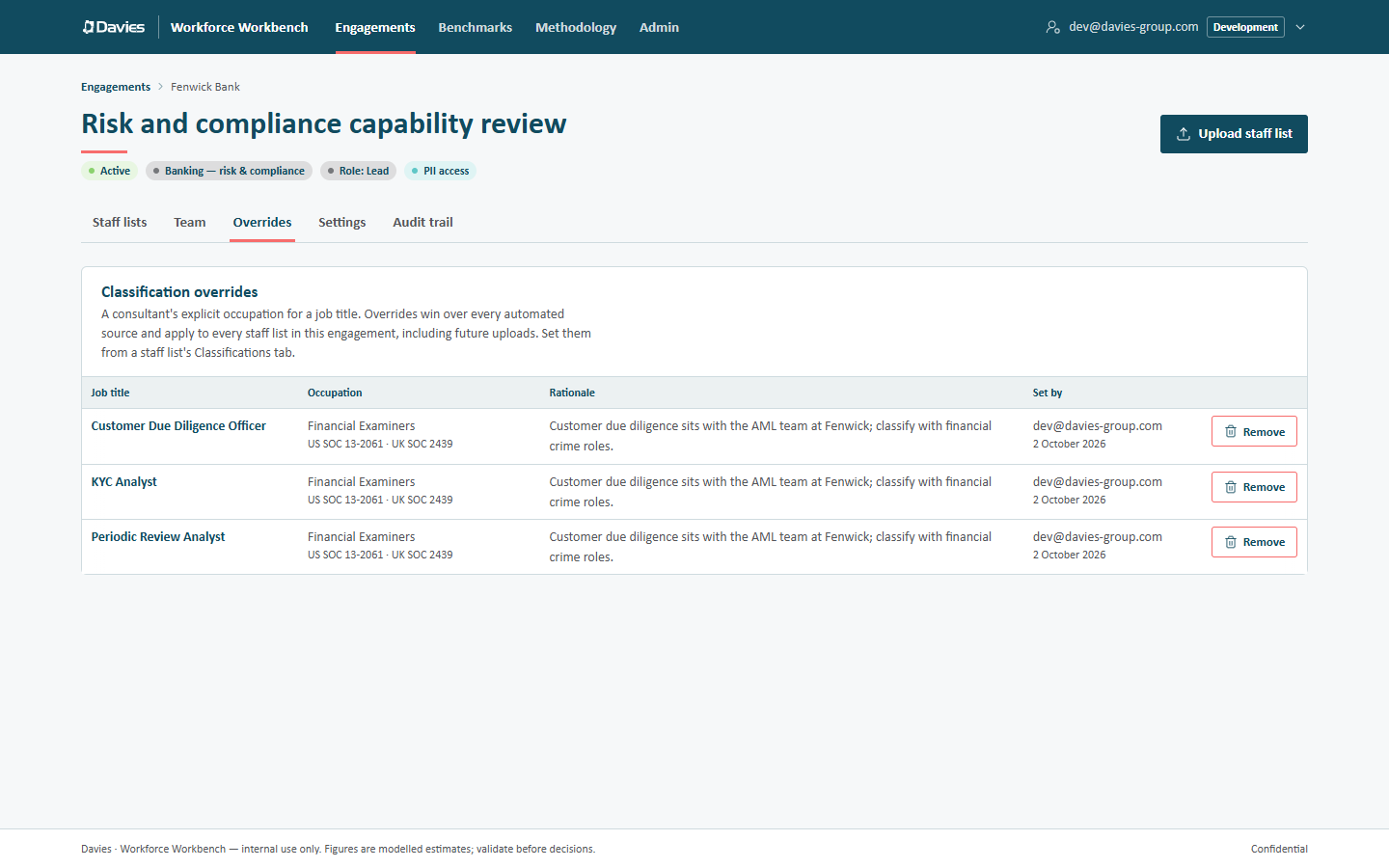
Leads and analysts can remove an override with Remove. The title is then reclassified without AI (industry pack, shared cache, then rules) and every affected staff list is rescored.
Overrides survive new uploads: the next staff list applies them automatically before any other source.
When a classification is wrong everywhere
If the shared cache holds a wrong answer for a title (so every engagement that shares classifications gets it), an administrator can remove it on Admin → Classification cache, so it's classified afresh next time it appears. See Classification cache. For the current engagement, an override is the immediate fix.
If a title-pattern rule itself is wrong, an administrator can change it in the reference data. See Reference data.
Step by step: Correct a classification.