Prompt Lab
The AI prompts are data, like the reference data. On Admin → Prompt Lab, administrators edit a draft of a prompt, test it (and the live version, side by side) against sample titles or a real staff list, and publish it. Every version is kept, and every test run that calls the model is metered and audited.
What a prompt must return is fixed in code: the platform checks every response against a fixed contract, so a badly edited prompt degrades to the rule-based fallback rather than producing unchecked output.
The four prompts
The list on the left shows each prompt with its live version and any draft (Version 2 live · draft 3).
| Prompt | Purpose | Variables |
|---|---|---|
| Title classifier | Maps a batch of distinct job titles to US SOC-2018 and UK SOC-2020 occupations with a confidence. Runs during classification for titles no override, pack rule or cache entry resolves. | {{context}}: the client's sector and region, for example Industry/sector: Insurance. Region: UK., followed by a blank line; empty when neither is known. {{titles}} (required): the batch as a numbered list, up to 150, each title written as a JSON string (1. "Claims Handler") so a title can't break out of its line. |
| Executive summary | Writes the board-ready executive summary shown on the Overview and in reports. | {{facts}} (required): the staff list's anonymised aggregates as JSON. {{citationSourceId}} (required): the staff list's citation id, the only source the answer may cite. |
| Value-chain mapper | Proposes an industry value chain and distributes each role's time across its phases. | {{sector}}: the client's sector, or unspecified. {{roles}} (required): up to 120 role types, one per line, as name (category, headcount). {{citationSourceId}} (required). |
| Ask the data | Answers a consultant's question about one analysis from its aggregates. | {{facts}} (required), {{question}} (required), {{citationSourceId}} (required). |
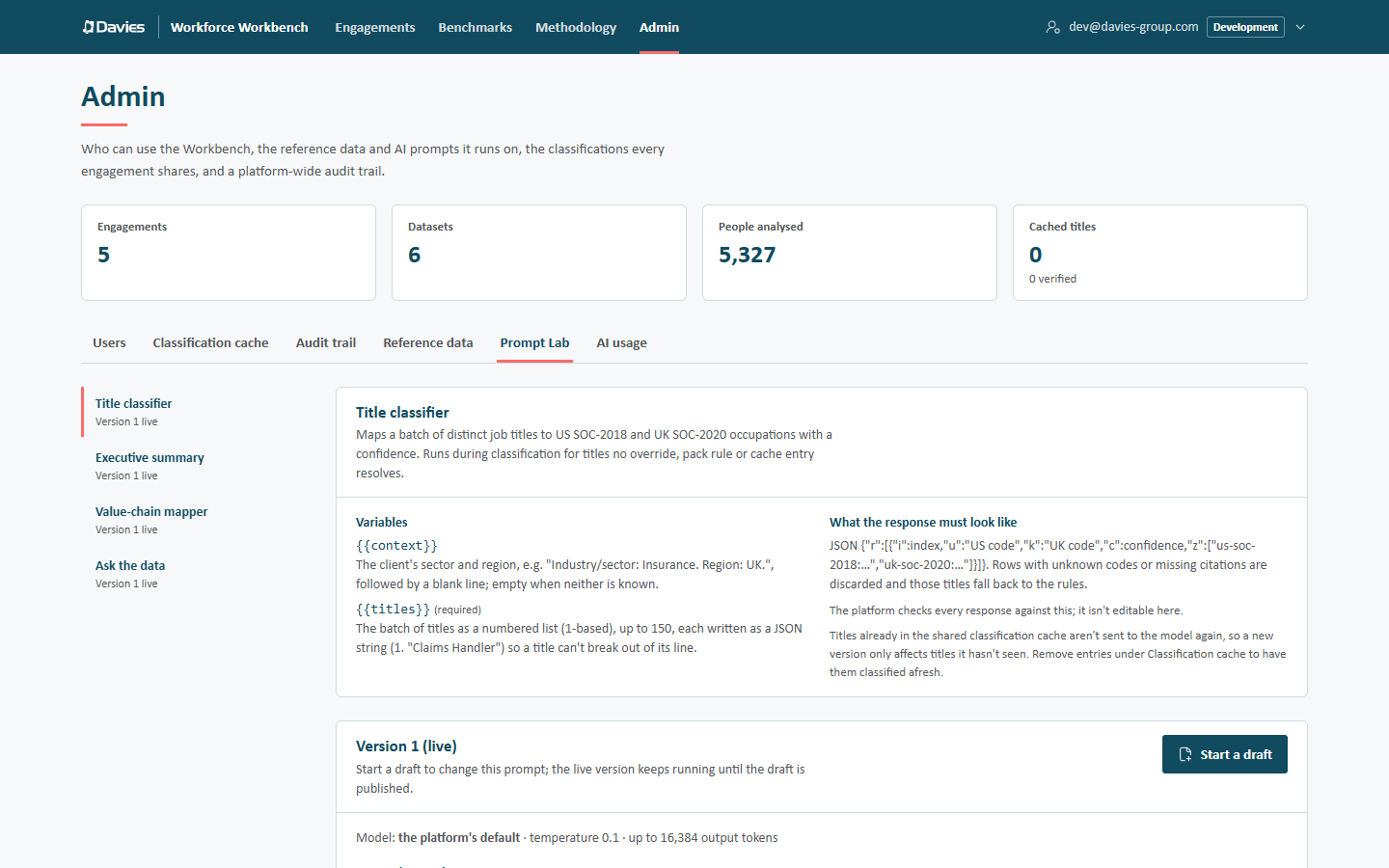
Each prompt's page opens with its purpose, its Variables (marked (required) where they are) and What the response must look like:
| Prompt | Response contract |
|---|---|
| Title classifier | JSON {"r":[{"i":index,"u":"US code","k":"UK code","c":confidence,"z":["us-soc-2018:…","uk-soc-2020:…"]}]}. Rows with unknown codes or missing citations are discarded, and those titles fall back to the rules. |
| Executive summary | JSON {"markdown": …, "confidence": …, "citations": […]}, where confidence is low, medium or high, with at least 40 characters of text and at least one citation of the staff list. Anything else shows the rule-based summary. |
| Value-chain mapper | JSON {"output": {"label", "phases": [{"key","name","definition"}], "weights": {role: {phaseKey: share}}}, "confidence", "citations"}. Three to seven phases are kept; missing weights are spread evenly. |
| Ask the data | As for the executive summary. An ungrounded answer is replaced by a polite refusal. |
The platform checks every response against this; it isn't editable here.
Editing a prompt
With no draft, the card shows the live version's text, model and settings, and Start a draft. A draft copies the live version (or use Draft from this in the history to start from an older one). Each prompt can have one draft at a time.
A draft has:
| Field | Notes |
|---|---|
| System instructions | The model's standing instructions. Variables available: lists the prompt's variables. |
| Message template | The message sent with each request, with {{variables}} filled in. |
| Model | Leave empty for the configured model (shown as the platform's default). Letters, digits, dots, dashes and underscores. |
| Temperature | 0 to 2. |
| Maximum output tokens | A whole number from 64 to 32,768. |
| Notes | What this draft changes, and why. |
Variables are written {{name}} and can appear in either the system instructions or the template. Values are inserted verbatim.
If someone else saves the same draft while we're editing it, saving stops with Someone else saved this draft while we were editing it: Load their version or Keep ours and save over theirs. Switching prompts or leaving the page with unsaved changes asks first: Leave without saving?
Checks
The draft is checked as we type. This draft can't be published yet lists any problems:
- the system instructions or template is empty, or longer than 20,000 characters;
- a
{{variable}}isn't one of this prompt's variables ({{foo}}isn't a variable for this prompt.); - a required variable doesn't appear anywhere (
{{titles}}must appear in the system text or template.); - the model name, temperature or token limit is out of range.
Publish and Run test (for the draft) are disabled until the draft passes.
Save draft saves (it reads Saved when there's nothing to save). Unsaved changes are also saved automatically before a test or before publishing. Switching to another prompt, another page or closing the tab with unsaved changes asks Leave without saving? (The changes we haven't saved to the draft will be lost.), with Leave to discard them.
Discard throws the draft away (The draft's changes are lost. The live version is unaffected.).
Testing
The Test card runs the draft and the live version on the same input. A preview renders the prompt without calling the model; a test run calls it and is metered like any other AI use.
Test input
Title classifier: Job titles, one per line, up to 50 (three samples are filled in), with Industry and Region for the context.
Executive summary, Value-chain mapper and Ask the data: a Dataset (a staff list), chosen from ready staff lists across every engagement (shown as client · engagement · staff list (headcount); administrators only), and for Ask the data a Question. The prompt gets that staff list's anonymised aggregates, exactly as in production. If there are none yet, the card says There are no ready datasets to test against yet.
Running
| Button | What it does |
|---|---|
| Preview prompt | A dry run: renders the system text and message with real variables, and shows them. Free, and works without AI. |
| Run test | Calls the model with the rendered prompt, then judges the response exactly as the platform would. Metered against the monthly budget, recorded under the prompt-lab feature, and audited as Tested a prompt. |
| Compare with the live version | When there's a draft, ticked by default: runs the draft and the live version side by side. |
If AI isn't configured, or the budget is spent, Run test can't call the model and returns a preview instead, headed The model wasn't called with the reason.
Results
Each result is headed with its version and Draft or Live (and Preview for a dry run):
- the model, duration, input and output tokens and estimated cost;
- The platform would accept this or The platform would reject this, with a summary, for example 48 of 50 titles classified; 2 would fall back to the rules. or Rejected: the platform would show the rule-based summary instead.;
- the parsed output: a table of Title, US occupation, UK code and Confidence for the classifier; the value chain's label, phases and number of roles placed for the mapper; the rendered markdown for the summary and Ask;
- Rendered prompt (open by default for previews): the exact system text and message sent;
- Raw response: the model's text as returned (long responses are truncated for display).
Paste 30 to 50 real titles from a recent engagement, including a few awkward ones, and run the draft against the live version. Look at how many titles each would classify, and whether the codes differ.
Publishing
Publish opens Publish version N: Every AI call of this kind uses the published version from the next request onwards. Enter What changed, and why (at least three characters) and choose Publish.
- The new version is used by the next AI call anywhere on the platform.
- Cached AI text (executive summaries, value-chain maps) already generated with the old version stays until it's regenerated or the staff list is rescored.
- Shared cache entries record the classifier prompt version that produced them. Titles already in the cache aren't sent to the model again, so a new classifier version only affects titles it hasn't seen; remove entries under Classification cache to have them classified afresh.
Publishing is audited (Published a prompt, with the notes).
Version history
Every version of the prompt with its Status (Draft, Live or Superseded), Notes and who published it when. View shows a version's full text and settings. Draft from this starts a draft from a published version, which is how to roll back: draft from the old version and publish it as a new one.
Step by step: Change an AI prompt.