Audit trail
Every change, upload, classification override, export, reveal, match, purge and administrative action is appended to the audit trail. Entries can't be edited or deleted: the database role the Workbench runs as can add entries but has no permission to change or remove them.
There are two views of it:
- Engagement → Audit trail (leads and administrators): every change, export and access to names and emails on this engagement.
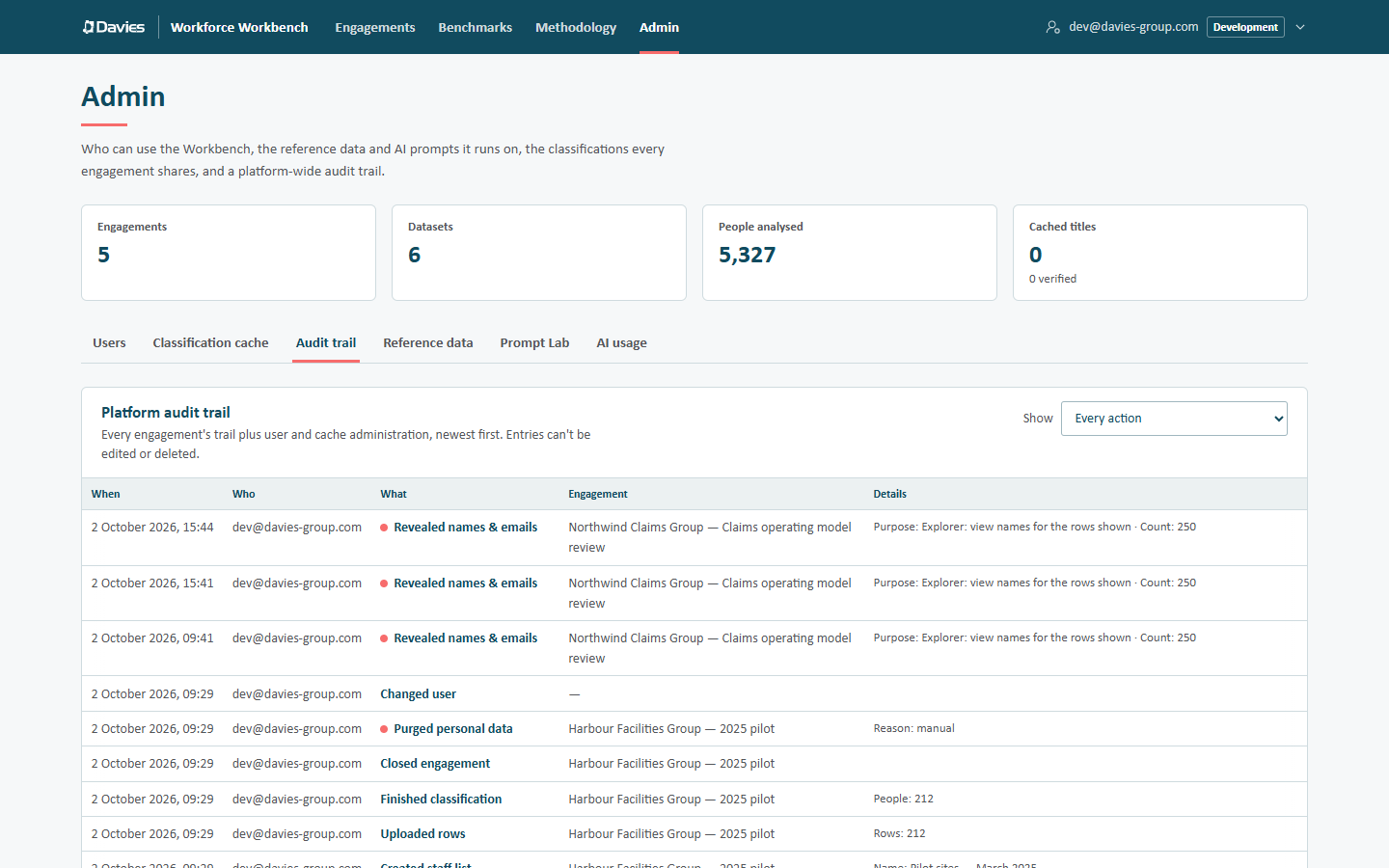
- Admin → Audit trail (administrators): the Platform audit trail, every engagement's trail plus user and cache administration, newest first, with an Engagement column (client and engagement name). The Show drop-down filters it to one action, or Every action.
Reading an entry
| Column | |
|---|---|
| When | Date and time, for example 2 October 2026, 09:41. |
| Who | The person's email, or System for automatic actions such as the nightly retention purge. |
| What | The action (see below). A salmon dot marks a personal-data action; the key under the table reads names and emails used or destroyed. |
| Engagement | Platform view only. |
| Details | The recorded details, for example Purpose: Explorer: view names for the rows shown · Count: 250. Details never contain names or emails of the client's staff. |
Entries are listed newest first, 100 at a time (1–100 of N): Newer and Older page through them.
Actions
| Action shown | Recorded when |
|---|---|
| Created client / Updated client | A client is added or changed. |
| Created engagement / Updated engagement | An engagement is created or its settings saved (with how many staff lists were rescored when the industry pack changed), or its report wording saved (recorded as updated or cleared; the wording itself isn't copied into the trail). |
| Closed engagement / Reopened engagement | Lifecycle changes. |
| Purged personal data ● | A manual or automatic purge (reason: manual or retention). |
| Deleted engagement | An administrator deletes an engagement. |
| Added team member / Changed team member / Removed team member | Team changes, with role and PII access. |
| Created staff list / Uploaded rows / Finished classification | The upload pipeline. |
| Changed assumptions | Assumptions saved (the staff list is rescored). |
| Renamed staff list / Deleted staff list | Staff list changes. |
| Rescored with new reference data | A staff list moved onto another reference data version (From and To). |
| Set classification override / Removed classification override | Overrides, with the rationale and how many staff lists were rescored (Staff lists rescored). |
| Uploaded names & emails ● | Identities stored at upload. |
| Revealed names & emails ● | Names decrypted, with the purpose and count. |
| Matched a people list ● | Emails matched against the encrypted index, with the purpose. |
| Exported | Any export, with its format and deliverable. |
| Saved Copilot plan / Deleted Copilot plan | Rollout plans. |
| Generated AI text | An executive summary, value-chain map or "Ask" answer, with the prompt version. |
| Added user / Changed user | User administration. |
| Verified cache entry / Deleted cache entry | Cache administration. |
| Started a reference data draft / Saved the reference data draft / Discarded a reference data draft / Published reference data | Reference data administration, with notes. |
| Started a prompt draft / Saved a prompt draft / Discarded a prompt draft / Published a prompt / Tested a prompt | Prompt Lab activity, including whether a test was a preview only and the model used. |
● marks personal-data actions.
Using the trail
- A client asks who accessed their people's names: open the engagement's Audit trail and look for the salmon-dot entries.
- Before restoring the database from a backup: list the purges made since the restore point (Purged personal data entries on Admin → Audit trail), because the restore rolls the audit trail back too, and those engagements must be purged again afterwards. See the developer guide's runbooks.
- Audit entries survive an engagement's purge.